Newborn photography is one of the most delicate genres of photography. Every tiny detail matters, from skin tone accuracy to soft lighting and gentle contrast. That’s why using the best Lightroom presets for newborn photography is not just a convenience, but a necessity for photographers who want consistent, professional-quality results.
Unlike standard portrait presets, newborn Lightroom presets are designed to handle sensitive baby skin, unpredictable lighting, and common color issues like redness or jaundice. A well-built preset can save hours of manual editing while keeping newborn photos natural, warm, and timeless.
In this guide, you’ll learn what makes a great newborn Lightroom preset, which paid and free presets perform best, and how to choose the right preset for your shooting style, whether you work in a studio or with natural light. This article is written from a professional editing and workflow perspective, not marketing hype.
Why Newborn Photography Needs Specialized Lightroom Presets
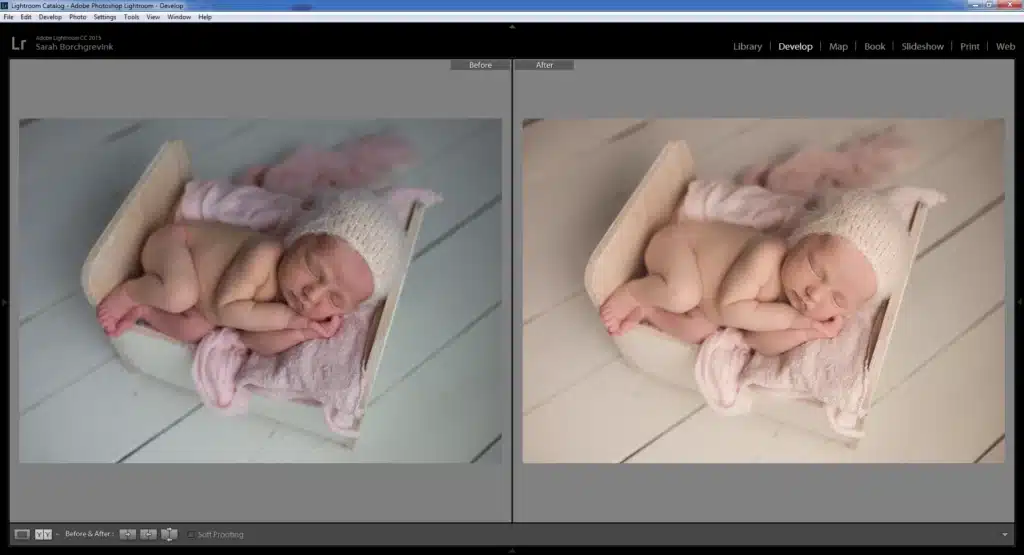
Newborn photography places unique demands on post-processing. Baby skin is thinner, more translucent, and reacts differently to light than adult skin. Even with perfect lighting, newborn photos often show redness, yellow undertones, flaky skin, or uneven color patches.
Standard portrait or family presets usually add contrast, clarity, and saturation — all of which can make newborn skin look harsh or artificial. Newborn presets, on the other hand, are built to soften tones, protect highlights, and maintain natural baby skin texture.
Specialized newborn Lightroom presets also account for:
- Low-contrast, high-key lighting setups
- Neutral whites in blankets and wraps
- Smooth transitions between shadows and highlights
- Minimal texture enhancement to avoid exaggerating dry skin
This level of control makes newborn presets fundamentally different from general photo editing presets.
What Makes a Great Newborn Lightroom Preset
Soft, Creamy Skin Tones
The hallmark of professional newborn photo editing is soft, creamy skin. The best presets gently lift luminance while keeping skin texture intact. They avoid aggressive clarity, sharpening, or saturation that can age the image.
Natural Warmth Without Color Cast
Warmth is essential, but too much warmth causes orange or yellow color casts. High-quality newborn Lightroom presets balance warmth with neutral whites, ensuring blankets and backgrounds remain clean.
Gentle Contrast and Low Clarity
Newborn presets use subtle contrast curves and low clarity settings. This creates a dreamy, airy look without flattening the image or losing depth.
Built-In Fixes for Redness and Jaundice
Advanced newborn preset packs include targeted brushes to:
- Reduce red blotches
- Correct yellow or purple skin tones
- Even out discoloration around hands, feet, and face
Consistency Across Studio and Natural Light
A strong newborn Lightroom workflow preset works well in both studio lighting and window-lit sessions, requiring only minor adjustments.
Best Paid Lightroom Presets for Newborn Photography
Paid presets are built for photographers who value consistency, speed, and refined results.
Top Professional Collections
1. Bella Baby Complete Newborn Workflow
Best for photographers who want a full editing system. Includes all-in-one presets, layerable adjustments, and advanced skin-retouching brushes.
2. Harmony Newborn Pro (LSP Actions)
Ideal for modern workflows. Uses AI masking in Lightroom to automatically detect skin and faces for smoother edits.
Greater Than Gatsby – The Newborn Collection
Known for accuracy across different lighting setups. Excellent for photographers who shoot in mixed light environments.
The Luxe Lens – First Years Collection
Designed for soft, film-inspired newborn photography. Works especially well with natural light sessions.
MCP Actions – Baby Steps
Beginner-friendly with professional results. Offers multiple strength levels and black-and-white newborn presets.
Natural Baby Presets by Emily Rau
Sensor-calibrated presets for Canon, Nikon, and Sony shooters who want true-to-life color.
Paid newborn Lightroom presets are best for photographers handling frequent sessions or client work.
Best Free Lightroom Presets for Newborn Photography
Free presets are a good starting point, especially for beginners.
Popular Free Options
PresetLove Newborn Preset
Brightens images and softens contrast for a cozy newborn look.
FixThePhoto Newborn Bundle
Includes multiple effects for skin smoothing, warmth, and matte finishes.
WeEdit.Photos “Pure Morning”
Works well for outdoor or window-light baby photography.
BeArt Newborn Preset
One-click preset focused on creamy skin and clean color.
Limitations of Free Presets
Free newborn Lightroom presets often:
- Lack advanced skin brushes
- Require more manual correction.
- Perform inconsistently across lighting conditions.
They are useful for learning but rarely replace a professional workflow.
Essential Editing Tools Included in Newborn Preset Packs
High-quality newborn Lightroom preset packs usually include more than just one-click presets.
Skin Retouching & AI Masking Brushes
Target flaky skin, redness, and uneven tones without blurring texture.
Color Correction Brushes
Fix yellow, red, or purple hues common in newborn skin.
Exposure & Workflow Presets
Separate presets for brightness, contrast, and vignette control.
High-Key Black & White Presets
Designed to keep skin silky and soft while maintaining tonal depth.
These tools transform presets into a complete newborn photo editing workflow.
Paid vs Free Newborn Presets: Which Should You Choose?
| Use Case | Free Presets | Paid Presets |
| Beginners | Good for practice | Better learning curve |
| Professional work | Limited | Consistent results |
| Time efficiency | Slower | Faster workflow |
| Skin correction tools | Minimal | Advanced brushes |
Free presets are enough for occasional shoots or personal projects.
Paid newborn Lightroom presets are worth it when consistency and time matter.
How to Choose the Right Newborn Presets for Your Style
- Studio vs Natural Light: Studio shooters need neutral presets; natural light photographers benefit from warmer tones.
- Camera Type: Sensor-calibrated presets ensure accurate colors across Canon, Nikon, and Sony.
- Style Preference: Choose film-style presets for softness or modern presets for clean tones.
- Lightroom Version: Confirm compatibility with Lightroom Classic and Lightroom Mobile.
Tips for Using Lightroom Presets on Newborn Photos
- Always adjust white balance before applying presets
- Use localized brushes instead of global skin smoothing.
- Avoid heavy texture or clarity adjustments.
- Keep baby’s skin tones natural, not overly warm.
Presets should enhance, not overpower, the image.
FAQs On Best Lightroom Presets for Newborn Photography
What are the best Lightroom presets for newborn photography?
Bella Baby, Harmony Newborn Pro, and Greater Than Gatsby consistently rank among the best for professional results.
Are Lightroom presets safe for newborn skin editing?
Yes, when used correctly. Quality presets focus on gentle adjustments and preserve natural skin texture.
How do you edit newborn photos in Lightroom?
Start with white balance, apply a newborn preset, then refine skin tones using targeted brushes.
Free vs paid newborn Lightroom presets — which is better?
Free presets are good for beginners. Paid presets offer better consistency, tools, and time savings.
Do newborn presets work with Lightroom Mobile?
Some do, but advanced brushes and AI masks are only available in Lightroom Classic.
Final Thoughts
The best Lightroom presets for newborn photography act as a foundation — not a shortcut. They help maintain consistency, protect delicate skin tones, and speed up your workflow without sacrificing quality.
Subtlety is key in newborn editing. Investing in high-quality presets pays off in the long run, especially for photographers delivering professional client work.