Imagine scrolling through an online fashion store, spotting a shirt that catches your eye, but something feels off—the neck looks crooked, or the fabric seems unnaturally stretched. These subtle flaws in product images can turn potential buyers away faster than a mismatched outfit. Ghost mannequin editing, also known as invisible mannequin editing or neck joint technique, removes the mannequin from apparel photos while keeping the garment’s natural shape and inner details intact. This method creates a hollow man effect, making clothes appear as if floating, which highlights fit, texture, and style without distractions.
Done right, ghost mannequin photo editing boosts e-commerce conversions by presenting realistic, professional images that build buyer confidence. However, errors in this process can degrade image quality, leading to lost sales and higher return rates. Studies from fashion e-commerce platforms show that high-quality visuals increase engagement by up to 30%, while flawed ones deter 40% of shoppers. Common pitfalls like misalignment or distortion often stem from rushed editing or inconsistent photography setups. In this guide, we’ll break down frequent ghost mannequin editing errors, explain their causes, and share proven fixes using tools like Photoshop’s layer masking and clipping path. Whether you’re handling apparel ghost mannequin editing in-house or outsourcing, avoiding these issues ensures your product photography stands out in a competitive market.
Common Ghost Mannequin Editing Errors
Ghost mannequin retouching mistakes can sneak in during shooting or post-processing, affecting everything from garment structure to color accuracy. Below, we dive into 15 typical issues in clothing ghost mannequin editing, with causes and step-by-step corrections.
1. Neck Misalignment
Neck misalignment in ghost mannequin editing often ruins the seamless look, making collars appear twisted or uneven.
This happens due to varying camera angles between front and inner neck shots, or imprecise layer alignment in Photoshop.
To fix it, always capture inner and outer neck photos from the same height and angle. In editing, stack layers and use the align tool under Edit > Auto-Align Layers. Fine-tune with the warp tool for a natural fit, ensuring the neck joint technique blends smoothly without gaps.
2. Uneven Shoulder Structure
Uneven shoulders in apparel photos create an asymmetrical, fake appearance that screams poor editing.
Common causes include non-symmetric mannequins or overzealous use of liquify tools, distorting the garment’s natural lines.
Correction starts with selecting a well-proportioned mannequin. In post-production, apply symmetry guides in Photoshop—duplicate the layer, flip it horizontally, and overlay for comparison. Adjust subtly with transform tools to balance both sides, preserving the fabric’s drape.
3. Visible Mannequin Edges
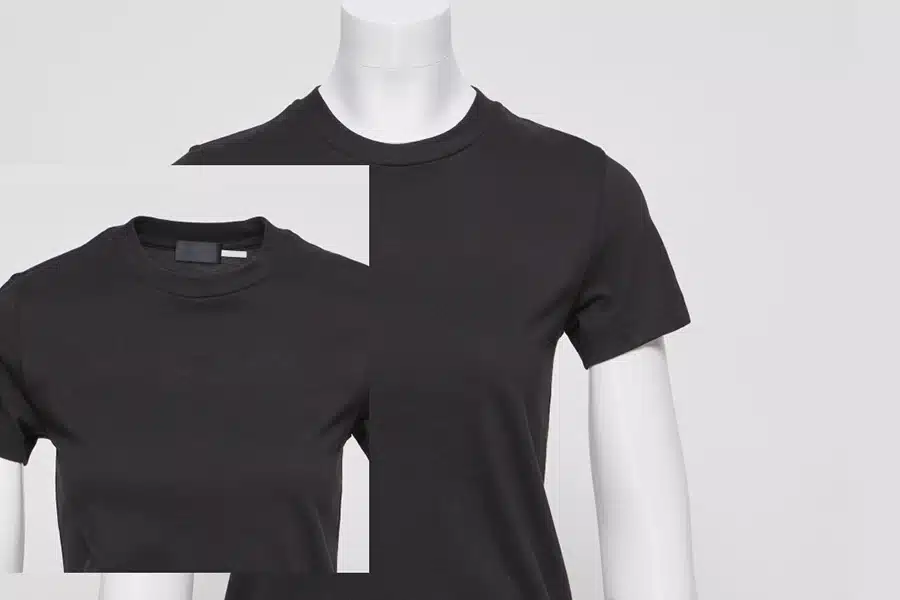
Visible mannequin parts, especially around sleeves or hems, indicate sloppy mannequin removal errors.
Editors go wrong by skipping detailed masking when colors blend or neglecting edge refinement in image retouching.
For clean removal, zoom to 300% in Photoshop and use the pen tool for precise clipping paths. Refine with the Select > Select and Mask feature, adding feathering to blend edges. This eliminates remnants, achieving a truly invisible mannequin editing result.
4. Fabric Distortion
Stretching and warping issues in clothing images make fabrics look unnatural, misleading buyers about texture and fit.
This stems from excessive warping during background removal or ignoring seam alignments in fashion product image editing.
Maintain natural fabric flow by editing in small sections—use the liquify tool sparingly on problem areas only. Reference the original photo to keep folds intact, ensuring the garment structure reflects real-world drape.
5. Lighting Mismatch
Inconsistent shadows and highlights across composite shots create a patched-together feel in product photos.
Causes include varying light sources during shoots or mismatched adjustments in image post-processing.
Match direction and intensity by first normalizing exposure with curve adjustments in Photoshop. Add subtle shadows using layer masks, drawing from a clean reference shot of the mannequin to mimic natural lighting.
6. Color Inaccuracy
Color shift problems lead to inaccurate apparel images, increasing returns when items don’t match expectations.
This occurs from uncalibrated monitors, inconsistent white balance, or over-reliance on auto-corrections.
Ensure true-to-life colors by calibrating your display and using color correction tools like levels or hue/saturation. Compare against physical samples under standard lighting for precise adjustments.
7. Rough or Jagged Edges
Poor masking errors result in jagged outlines that scream low-quality eCommerce ghost mannequin images.
Low-res starting images or hard-edged selections without refinement cause this.
Refine edges by working on high-resolution files and using the refine edge brush in Select and Mask. Feather at 1-2 pixels for smooth transitions, avoiding the amateur look.
8. Over-Smoothing Fabric
Loss of texture and realism happens when editors blur away natural details, making clothes appear plastic.
Overzealous retouching to “perfect” creases or textures is the culprit.
Balance smoothness and detail by selectively healing distracting wrinkles with the spot healing brush. Preserve fabric texture using frequency separation techniques to separate texture from color.
9. Wrong Proportions
Unnatural garment shape misleads on sizing, a frequent ghost mannequin editing problem.
Stretching to fit templates or incorrect scaling of inner parts causes this.
Keep realistic sizing by locking aspect ratios during resizing (hold Shift while transforming). Cross-check with size charts and avoid global distortions.
10. Misaligned Labels or Tags
Placement mistakes make brands look careless, affecting trust in product photo editing for apparel.
Rushed masking around tags or poor layer organization leads to shifts.
Accurate fixes involve protecting label areas with separate masks. Align manually using guides, and sharpen text for clarity without over-sharpening.
11. Background Inconsistency
Mismatched backgrounds disrupt uniformity across image sets.
Multiple editors without standards or varying export settings cause this.
Keep uniform backgrounds by defining a style guide—use pure white (#FFFFFF) and batch process with actions in Photoshop for consistency.
12. Over-Sharpening
Artificial-looking details from halos and noise ruin the professional vibe.
Compensating for soft images or applying global sharpening too aggressively is common.
Apply correct levels using high-pass filters on a duplicate layer set to overlay. Preview at 100% zoom to avoid excess.
13. Cropping and Framing Errors
Inconsistent framing scatters focus in fashion eCommerce listings.
Ignoring platform guidelines or cropping too tightly causes issues.
Proper alignment means centering the garment with even margins. Follow marketplace specs, like Amazon’s 85% product fill, for optimal display.
14. Lack of Depth
Flat-looking images fail to convey 3D shape, a key in ghost mannequin image editing.
Over-removing shadows or poor blending of inner parts flattens the result.
Create natural inner depth by adding subtle drop shadows via layer styles. Use offset cards during shoots for realistic highlights and depth.
15. Skipping Quality Checks
Common final-stage mistakes let errors slip through, harming overall quality.
Rushing without reviews or checking on multiple devices is typical.
Prioritize review by using checklists: zoom for edges, check colors on calibrated screens, and compare sets for consistency before delivery.
Best Practices to Avoid Ghost Mannequin Errors
Preventing ghost mannequin editing issues starts at the shoot and carries through editing.
Set up consistent photography with taped positions for mannequins and tripods, ensuring the same lighting and framing across shots. Choose the right mannequin size to avoid distortions from the start.
Hire skilled editors trained in Photoshop techniques like non-destructive masking. Provide clear guidelines on color profiles and shadow creation.
Work with layered PSD files to allow easy revisions. Implement checklists covering alignment, texture, and proportions for every batch.
These steps streamline workflows, reduce rework, and deliver polished eCommerce ghost mannequin images.
| Best Practice | Benefit | Tool/Tip |
| Consistent Setup | Reduces mismatches | Tape positions, use shadow cards |
| Trained Editors | Minimizes errors | Focus on layer masking, the pen tool |
| Layered Files | Easy fixes | Save as PSD, use actions for batch |
| Checklists | Ensures quality | Review edges, colors, and depth |
FAQs
What is ghost mannequin editing?
Ghost mannequin editing removes the mannequin from clothing photos, combining front, back, and inner shots to show the garment’s full shape naturally. It uses techniques like clipping paths and layer masking in Photoshop for a floating, realistic effect.
How do I fix neck misalignment in ghost mannequin retouching?
Capture consistent angles, align layers in Photoshop, and use the warp tool for adjustments. This creates a seamless neck joint.
Why do my apparel images have fabric distortion after editing?
Excessive liquification or warping causes this. Fix by editing selectively and preserving original folds to maintain natural flow.
What causes visible mannequin edges in product photos?
Poor masking, especially with similar colors. Refine with the pen tool and feathering for clean removal.
How can I avoid lighting mismatch in ghost mannequin images?
Normalize exposure first, match shadows using curves, and shoot under controlled lights for consistency.
Is over-sharpening a common issue in fashion product image editing?
Yes, it creates artifacts. Use selective high-pass sharpening and preview at full size to keep details natural.
Conclusion
Precision in ghost mannequin editing separates standout e-commerce visuals from forgettable ones. By tackling common errors like neck misalignment, fabric distortion, and lighting issues, you create clean, natural images that showcase apparel authentically.